Komplette digitale Lösung für das Restaurantmanagement

Verwalten Sie Ihre Menüs, Kundenfeedbacks und QR‑Codes – alles auf einer benutzerfreundlichen Plattform, die Zeit spart und Ihr Geschäft verbessert.

Häufig gestellte Fragen

Hier finden Sie Antworten auf häufig gestellte Fragen.
Does QRCio work with POS systems?
QRCio can seamlessly integrate with your POS system using the Pro subscription package (coming soon). Menu items will be synced with your POS, and QRCio orders will be sent directly to your POS system.
Why isn’t the QRCio app listed in the app store right now?
We use a progressive web app that works just like a traditional app. You can easily install it on your smartphone by following these steps: For iOS Safari: Tap the “Share” button and select “Add to Home Screen.” When you tap “Add” in the top right corner, you’ll see our app icon on your Apple device. For Android Chrome: Tap the “three dots” icon in the top right to open the menu. Select “Add to Home Screen.” After tapping “Add” in the popup, you’ll see our app icon on your Android device.
Can my QR code expire?
As long as you continue using our service, your QR code and QRCio menu link will remain active indefinitely.
Can you create a menu for me?
Just send an editable version of your menu to [email protected] via email. Don’t forget to include your food photos, logo, and website URL so our talented design team can help create your menu.
Do I have to enable the waiter call module?
You can disable the ordering feature and simply use our platform to create and display your menu.
Can customers pay with credit cards, Apple Pay, or Google Pay?
Yes! We’re currently in the process of integrating credit card and mobile payment systems like Apple Pay and Google Pay, coming very soon.
Can one profile manage multiple restaurants?
QRCio allows you to manage multiple restaurants, each with its own unique menu.
Can I quickly create a menu using templates?
Of course! QRCio provides ready-to-use templates for fast menu creation, or you can design a custom menu yourself.
Can I create a menu without images?
Yes, you can create a menu without photos—images are optional.
I already have a PDF menu. Can I upload it instead?
If you prefer, you can upload your existing PDF menu without creating a new menu on the platform.
Can I cancel my subscription anytime?
Definitely! You’re free to cancel your subscription whenever you like.
Can I upgrade my subscription?
You can easily upgrade your subscription from the managed subscription section.
If I don’t make a payment, will my menu and QR code remain active?
If you don’t make a payment, your account will switch to the free plan. Your menu and QR code will remain active for a while under the free subscription.
What size should my QR codes be?
QR code size depends on viewing distance. 4 cm is enough for tables. For counters or further distances, a larger size is recommended.
Where should I place my QR codes?
QR code menus work for dine-in, delivery, and pickup. Place them on tables, entrance points, pickup areas, or delivery bags.
Will the smart menu be downloaded to my customers’ phones?
No, QRCio QR codes don’t force a PDF download. Customers browse the smart menu, place orders, and exit via the browser.
Do people of all ages know how to scan QR codes?
QR codes are widely used, and most customers are familiar with them regardless of age or tech knowledge. Most smartphones have built-in QR code scanners, so no separate app is needed.
Can I combine multiple menus under a single QR code?
With QRCio’s smart menu, you can combine all your menus under one QR code.
Can I upload a new menu in the future and keep using the same QR code?
Our system supports dynamic QR codes, meaning your code stays the same even if your menu changes. Customers scanning it will always see your latest menu.
Menüs erstellen

Erstellen Sie mehrere Menüs per Drag‑and‑Drop und organisieren Sie Kategorien, Gerichte, Getränke und mehr. Alternativ können Sie Ihr bestehendes Menü als PDF hochladen.

Menü gestalten

Personalisieren Sie Ihr Menü mit individuellen Designoptionen passend zu Ihrer Marke. Wählen Sie Farbpaletten, Ihr Logo und weitere Funktionen, um Ihr Menü einzigartig zu machen.

Einfache Lokalisierung

Wir bieten eine einfache Methode, mehrere Sprachen hinzuzufügen. Lokalisieren Sie Kategorien, Gerichte, Getränke und mehr in mehreren Sprachen.


Wir bieten eine einfache Methode, mehrere Sprachen hinzuzufügen.

Wir bieten eine einfache Methode, mehrere Sprachen hinzuzufügen.


Wir bieten eine einfache Methode, mehrere Sprachen hinzuzufügen.

Wir bieten eine einfache Methode, mehrere Sprachen hinzuzufügen.

Erstellen Sie Ihren individuellen QR‑Code

Erstellen Sie Ihren individuellen QR‑Code und passen Sie ihn an Ihre Marke an.


Laden Sie Ihren QR‑Code herunter und platzieren Sie ihn auf Ihren Tischen oder Werbematerialien.
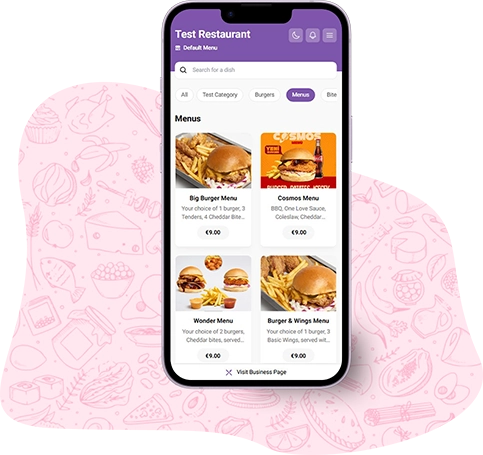
Entdecken Sie unsere Pakete

Wählen Sie das Paket, das zu Ihrem Unternehmen passt – beginnen Sie sofort mit der Nutzung Ihres flexiblen, leistungsstarken und anpassbaren Online‑Menüs.
Brauchen Sie ein individuelles Paket?
Kontaktieren Sie uns, um ein maßgeschneidertes Paket zu erstellen.
Vertrieb kontaktieren
Neue Inhalte aus unserem Blog
Erstellen und verwalten Sie Ihr QR‑Menü mühelos. QRCio ist kostenlos und einfach zu bedienen. Erstellen Sie Ihr QR‑Menü und nutzen Sie es sofort.